
01.03 - Foundations of Salesforce QA
0103 - Salesforce vs Traditional Testing

Free Preview — 01.03: Salesforce vs Traditional Testing
Salesforce isn’t custom software — it’s a platform. That one difference changes everything about how testers work.
This lesson compares traditional testing strategies with Salesforce realities, showing why specific methods fail while others become essential.
If you’re transitioning from general QA to Salesforce QA, this mindset shift will change how you approach testing forever.
Continue reading → (paid content below)
1. Introduction
Traditional software testing and Salesforce testing are often grouped together under the same umbrella — but in reality, they differ in multiple fundamental ways. Anyone joining a Salesforce project with experience from custom software, ERP testing, or ISTQB‑driven environments quickly discovers:
Salesforce behaves differently.
Salesforce develops differently.
And therefore — Salesforce must be tested differently.
This lesson explains why those differences exist, how they impact your daily QA work, and what mindset is required to transition from “generic tester” to “Salesforce QA Consultant”.
---
2. The Core Difference: Platform vs Product
In traditional testing, you typically validate:
software that your team built from scratch
backend logic fully implemented by developers
UI that your team owns completely
integrations fully designed by your architects
You test a product that your team controls end‑to‑end.
In Salesforce, the situation is fundamentally different:
You are not testing Salesforce.
You are testing a solution built inside Salesforce.
This means:
you cannot change or debug the platform itself
you cannot influence most backend behaviours
you work with a predefined metadata‑driven architecture
your tests must respect Salesforce limits, features, and constraints
you validate configuration, automation, permissions, and custom logic layered on top
Most defects in Salesforce delivery come not from “broken Salesforce”, but from:
misconfiguration
misunderstood business logic
incomplete requirement analysis
incorrect security settings
unintended automation interactions
side effects between flows, Apex and UI
Understanding this foundational difference changes the entire testing strategy.
---
3. The Development Model: Declarative vs Programmatic
Traditional development is almost exclusively code‑driven:
Java, .NET, Python, SQL layers, API endpoints, custom UIs, etc.
Salesforce development follows a hybrid model:
Declarative (point‑and‑click)
Configuration done through Setup:
fields, objects, profiles, permission sets
page layouts, lightning pages
validation rules
flows
approval processes
assignment and escalation rules
Programmatic (code / Apex)
Used only when declarative tools are insufficient:
Apex classes, triggers, batch jobs
LWC components
custom controllers
integration handlers
Testing impact
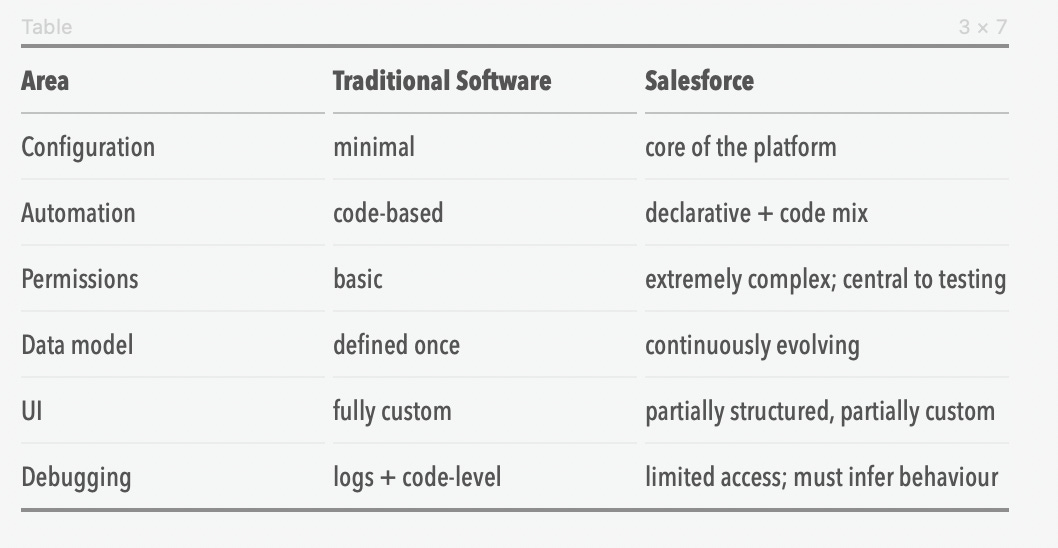
Salesforce testers must be comfortable navigating both worlds.
You aren’t just executing test steps — you understand the underlying architecture.
---
4. Release Structure: Linear vs Evergreen Platform
Traditional teams often work on static versions:
Version 1.0 → 1.1 → 1.2 → 2.0
Salesforce operates on a continuous delivery model:
3 major releases every year (Spring, Summer, Winter)
ongoing security patches
automatic changes applied to production and sandboxes
occasional deprecation of old features (e.g., Workflow → Flow migration)
Testing impact
your test cases must stay up to date with platform changes
flows or layouts may behave differently after a release
UAT may occur shortly after Salesforce performs a major update
deprecated tools force you to re‑evaluate test strategy
In Salesforce, test assets decay faster unless maintained regularly.
---
5. Security Model: Simple vs Multi‑Layered
Traditional systems often have straightforward roles & permissions.
In Salesforce, access control operates at multiple layers:
object‑level CRUD
field‑level security
record‑level access (sharing rules, OWD, roles)
permission sets & permission set groups
muting permissions
custom permissions
data category access
UI visibility rules
A tester must evaluate all of them.
Real impact example
A user cannot update a Case. Why?
Possible reasons:
no Edit on the Case object
FLS hides a required field
OWD is Private and the user is not the owner
a validation rule blocks update for this profile
a flow throws an unhandled exception due to missing permissions
One visible symptom → multiple possible root causes.
This complexity does not exist in most traditional systems.
---
6. Automation Complexity: Code vs Metadata Interactions
In code‑based systems, you test integrations between modules your team implemented.
In Salesforce, automation layers may include:
validation rules
flows triggered before save / after save / on schedule / on platform events
old legacy Workflow Rules
Process Builders still lurking in some orgs
Apex triggers
Apex classes called by flows
integrations firing outbound messages or REST calls
The challenge
Declarative automation and Apex can conflict.
For example:
Flow updates a record → Apex trigger fires → another Flow is invoked → Validation Rule blocks the update → UI shows unrelated error.
Understanding dependency chains is the essence of Salesforce QA.
---
7. Data Model: Static vs Continuously Mutating
Traditional systems rarely change their database structure mid‑project.
Salesforce constantly evolves its metadata model:
new fields
new relationships
new validation rules
dependency rewiring
A single field added in a sprint may impact:
10 flows
4 Apex triggers
6 page layouts
multiple profiles & FLS rules
Testing impact
Salesforce QA must always test update paths, not only create/read.
---
8. End‑to‑End Processes: Linear vs Multi‑Actor
Many systems test single‑user workflows.
Salesforce requires testing:
multiple actors with different permissions
cross‑object automation
business processes spanning multiple teams
integrations triggered implicitly (async)
Typical E2E flows:
Lead → Opportunity → Quote → Order
Case creation → routing → escalation → resolution
Customer onboarding workflows
Renewal or contract lifecycle processes
Salesforce testers must understand business logic deeply — not just test steps.
---
9. Negative Testing: Optional vs Mandatory
Traditional systems often focus on positive‑path coverage first.
In Salesforce:
negative testing is essential because:
permissions vary by actor
validation rules exist only to block unwanted behaviour
flows may throw exceptions in partial‑update scenarios
Apex has explicit limits that must be respected
incorrect field combinations may break automation
Salesforce QA can’t skip negative paths — they uncover the majority of real defects.
---
10. Debugging: Direct vs Indirect
Traditional debugging:
stack traces
logs
code stepping
local environments
Salesforce debugging:
limited logs
no local environment
restricted system internals
complex automation chains hidden inside metadata
Testers must deduce root causes by:
isolating actors
reproducing flows step‑by‑step
correlating metadata changes
leveraging Developer Console and debug logs carefully
This is more investigative — almost forensic — than traditional QA.
---
11. Summary
To succeed in Salesforce QA, testers must shift from:
verifying UI steps → to analyzing metadata‑driven behaviour
thinking in terms of “features” → to thinking in terms of “impact areas”
expecting full control → to working within platform constraints
validating what developers wrote → to validating what consultants configured + what developers extended
focusing on single‑system coverage → to covering multi‑layer processes and automation interactions
Salesforce testing is not harder — it’s different.
The sooner testers embrace this, the faster they become true Salesforce QA specialists.
---
End of Lesson 01.03